AI Content Generation
How LEIA generates lecture content, quizzes, slides, and video.
LEIA uses multiple AI models and pipelines to produce complete learning experiences from structured course data.
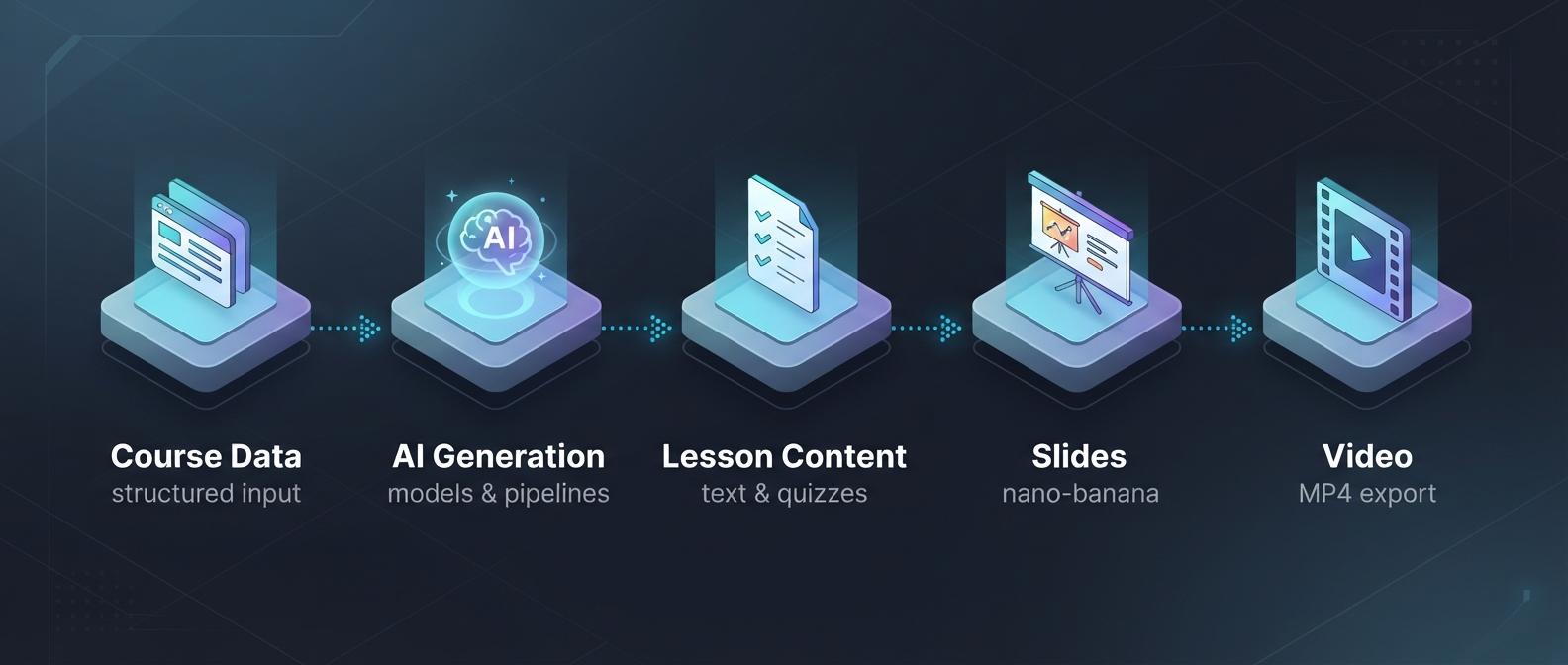
Lesson Content
The lesson generation pipeline produces full lecture content including:
- Overview & learning outcomes — What the student will learn
- Lecture body — MDX-formatted text with code blocks, diagrams, and interactive elements
- Knowledge checks — Inline quizzes and exercises
- Key terms — Glossary definitions for important concepts
POST /api/v1/lessons/{lessonId}/generate-content
POST /api/v1/courses/{courseId}/lessons/generate-all
Slide Generation
Slide generation produces slide images, synchronized narration scripts, and voice-over audio. The batch endpoint supports nano-banana illustrated slides (the default), gemini-html, and claude-pptx.
Discover active templates
GET /api/v1/slide-templates?method=ILLUSTRATED
GET /api/v1/slide-templates?method=HTML
The template catalog returns active templates available to your organization, including key, name, description, previewImageUrl, and templateMethod. Use an illustrated key in options.template or an HTML key in options.htmlTemplate. Template availability can change: refresh the catalog if a selected key becomes unavailable instead of keeping a permanent hardcoded list.
Select a narration voice
GET /api/v1/narration-voicesThe voice catalog returns provider, defaultVoice, and voices. Each voice has a value and characteristic. Pass a returned value, such as Kore, through options.voice:
POST /api/v1/courses/{courseId}/lessons/generate-slides{
"lessonIds": ["lesson-id"],
"method": "nano-banana",
"options": {
"template": "<active illustrated template key>",
"voice": "Kore"
}
}The per-lesson POST /api/v1/lessons/{lessonId}/slides-narration endpoint accepts the same options.voice. If omitted, the course narration profile takes precedence; otherwise slide narration defaults to Aoede. The old alloy example was incorrect for the Gemini narration provider.
Design Blueprint for HTML Slides
- Select an HTML key from the template catalog.
- Generate a Blueprint with
POST /api/v1/courses/{courseId}/design-blueprint/generateand{ "inspiredFromTemplateKey": "<active HTML key>" }. The response containsblueprint; generation does not save it. - Save the Blueprint with
PUT /api/v1/courses/{courseId}/design-blueprintand{ "blueprint": "<generated or edited text>" }. Usenullto clear it. - Generate slides with
method: "gemini-html". Saved Blueprints apply to this method.
For example, the batch slide endpoint accepts:
{
  "lessonIds": ["lesson-id"],
  "method": "gemini-html",
  "options": {
    "htmlTemplate": "<active HTML key>",
    "voice": "Kore"
  }
}
Learning Bits
Learning Bits must be enabled for the account; otherwise the API returns 403. The source lesson must already contain content and belong to the requested course.
- Discover illustration styles using
GET /api/v1/learning-bits/illustration-styles. - Create a draft set using
POST /api/v1/courses/{courseId}/learning-bits:
{
  "lessonId": "lesson-id",
  "requestedCount": 3,
  "illustrationStyleKey": "<active illustration style key>"
}
requestedCount is optional and accepts 1–10. illustrationStyleKey is optional. The response includes the set's id, courseId, lessonId, status, and bits; use id as setId.
- Render the set using
POST /api/v1/courses/{courseId}/learning-bits/{setId}/render. Media preparation happens before rendering is queued, so the request can take time. The response containssetId,jobId, andestimatedCredits. - Poll the returned job and list the course's sets using
GET /api/v1/courses/{courseId}/learning-bitsto inspect status and output media.
If rendering returns 500, inspect the set status before retrying. Draft editing and deletion are not yet exposed through the Partner REST API.
Video Export
Slide generation can queue video export automatically. Check existing export jobs before requesting another export. To export ready slides as MP4 explicitly:
POST /api/v1/courses/{courseId}/lessons/generate-videosJob Tracking
Monitor queued generation and export jobs through:
GET /api/v1/courses/{courseId}/jobs
GET /api/v1/jobs/{jobId}
Stop polling when a job completes or fails. A progress percentage alone does not prove a worker is still running. Polling consumes the same API key allowance as generation; pause on 429 RATE_LIMITED and follow the rate-limit reset rules.
Language Configuration
Control the output language with the languageConfig object available on most endpoints:
{
  "languageConfig": {
    "contentLanguage": "ko",
    "tutorLanguage": "ko",
    "supportedLanguages": ["ko", "en"],
    "culturalContext": "Korean workplace training"
  }
}